Stock & Options Tracking / 5 MIN READ
How to Track Credit Spreads and Iron Condors in Excel
Learn to journal multi-leg options trades in Excel, including credit spreads, iron condors, partial closes, rolls, fees, and position-level P&L.
A trading journal becomes much more useful when it records the whole position, not just a collection of option fills. A vertical spread can involve two opening fills and two closing fills. An iron condor can involve four legs, with more transactions if you adjust or roll it. If those rows are not connected, your trade history becomes difficult to reconcile.
This guide walks through a practical Excel approach using fictional trades. The examples explain recordkeeping principles, not a trading recommendation or a claim about investment returns.
Why one row per trade breaks down for spreads
A single-row journal might record a credit spread as “opened for $0.80, closed for $0.30.” That can work for a straightforward position, but it hides which contracts were traded, when each leg was filled, and what happened if only part of the position was closed.
A more flexible structure uses one row per fill and assigns the same Trade ID to all fills belonging to the same position. A useful ledger captures:
- Trade ID, fill date, underlying symbol, and strategy label
- Expiration, call or put, strike, and buy or sell action
- Number of contracts, fill price, and commissions or fees
- Notes explaining whether the fill opened, closed, or adjusted the position
Keep the trade grouping consistent. A broker order ID and a journal Trade ID are not necessarily the same thing.
Worked example: recording a credit spread
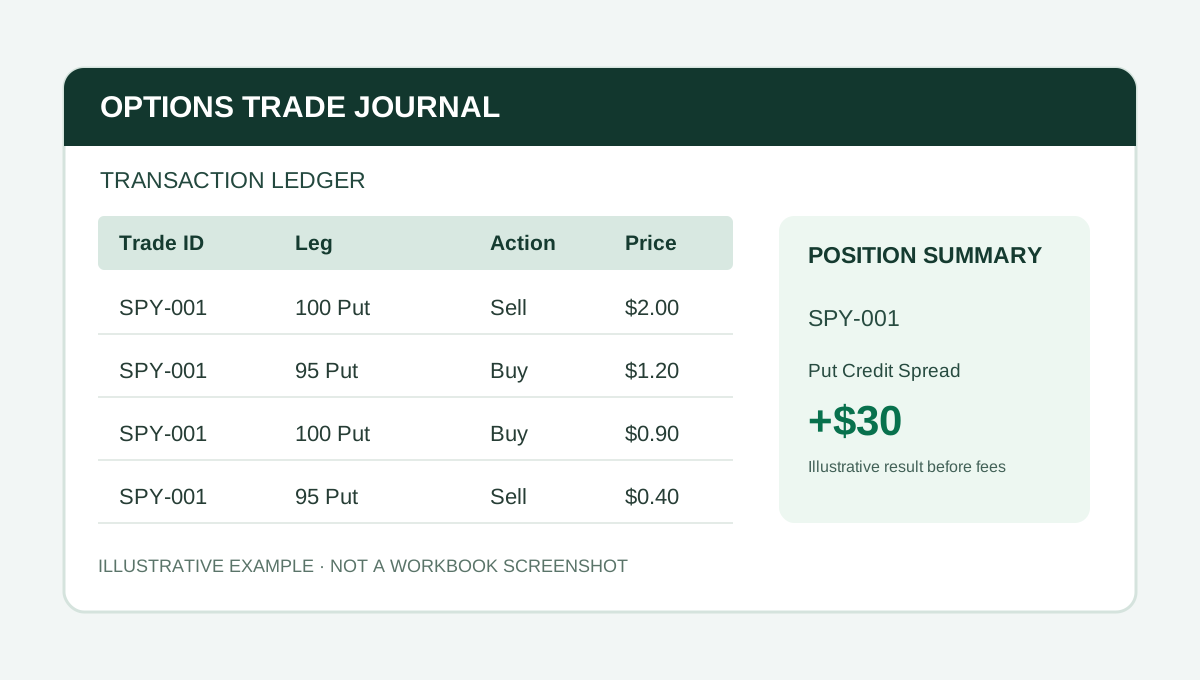
Suppose a trader opens one hypothetical put credit spread with a 100 multiplier:
- Sell one 100-strike put for $2.00.
- Buy one 95-strike put for $1.20.
The opening net credit is $0.80 per share, or $80 per spread before fees. Both fills receive a Trade ID such as SPY-001.
Later, the trader closes the short put for $0.90 and sells the long put for $0.40. The closing net debit is $0.50 per share, or $50. The realized result for this complete example is $30 before commissions and fees.
Record all four fills under SPY-001. That way, the ledger preserves the actual transaction history while the position summary can display one completed trade. Confirm whether your workbook's sign conventions and fee treatment match your broker statements.
Tracking an iron condor as one position
An iron condor has four option legs. If each opening fill is recorded separately, all four should share a Trade ID, such as QQQ-002. The position summary should group those fills instead of counting four unrelated trades.
If the trader closes only the call side, the journal needs to preserve both the realized result of the closed legs and the still-open put side. This is why an overall position status should not be inferred from one closing transaction.
For example, a four-leg opening uses four ledger rows. Closing all four legs separately uses four more. Additional adjustments increase the number of rows needed.
How to record rolls and adjustments
A roll is not a magic reset of an old trade. It involves closing existing contracts and opening replacement contracts. A clear journal retains the closing fills for the old legs and opening fills for the new legs.
There are two reasonable conventions:
- One continuous Trade ID: Use when you want to evaluate the entire adjusted trade campaign as one position.
- A new linked Trade ID: Use when you want to measure each replacement position separately while retaining a reference to the original trade.
Whichever convention you use, document it consistently. Avoid counting a roll's incoming credit as profit without also accounting for the cost of closing the previous position and the remaining exposure.
Separate cash flow from realized P&L
Premium received is not automatically profit. Selling an option brings in cash, but it also creates an obligation. Likewise, a position's open value can change without the trade being closed.
For a completed position, reconcile the signed cash flows from every opening and closing fill, then subtract commissions and fees. For an open position, distinguish realized cash flows from unrealized mark-to-market value and any remaining exposure.
Return-on-capital calculations also depend on the capital or risk basis you choose. Document that denominator instead of comparing percentages that were calculated using different conventions.
What to review after each closed trade
A useful journal answers more than “Did I win?” Review your results by:
- Strategy, such as put credit spreads, call debit spreads, and iron condors
- Underlying ticker and expiration
- Trade count, realized P&L, and fees
- Wins and losses using a clearly defined closed-position convention
- Notes on adjustments, exits, and whether the original trade plan was followed
A small sample can be misleading. A high win rate does not establish positive expectancy without considering the size of losses, costs, and risk.
Excel journal or subscription software?
An Excel journal may appeal to traders who prefer a one-time purchase, editable records, and a manual review process. The tradeoff is that you must maintain the data. Subscription platforms may offer brokerage imports and more automation, but availability and accuracy vary by provider.
Before buying a spreadsheet, check the supported strategies, how it groups legs, whether it handles partial exits, its row capacity, Excel compatibility, and whether imports are automatic or manual.
A workbook built for multi-leg recordkeeping
Options Command Center from The Finance Desk is an Excel workbook designed to connect option fills by Trade ID and summarize positions, strategy performance, and ticker results. It includes a transaction ledger, positions, dashboard, strategy rankings, ticker report, stock ledger, and manual broker-import staging sheet.
The standard edition has prefilled formulas for 200 ledger rows, 40 position summaries, and 20 stock lots. Each fill occupies a ledger row, so consider your trading frequency when assessing capacity. The import area is a manual paste-and-check workflow, not live broker synchronization.
Check the Payhip listing for current pricing, included files, and purchase terms. The Pro edition adds risk and trade-review tools for traders who need them.
Bottom line: The most useful options journal is the one you can reconcile consistently. Keep every fill, connect related legs, and judge the complete position rather than isolated premiums.
PUT IT INTO PRACTICE
Options Command Center
Connect fills, legs, rolls, and adjustments by Trade ID, with position summaries and strategy reporting.
View Options Command Center on PayhipCheck Payhip for current pricing and compatibility.
Educational content. Examples are fictional and should be adapted and checked against your own reporting policies.
More from Stock & Options Tracking →