Stock & Options Tracking / 3 MIN READ
How to Calculate Credit Spread Profit and Loss in Excel
Calculate credit spread opening credit, closing debit, realized P&L, fees, and defined maximum loss using clear Excel formulas and worked examples.
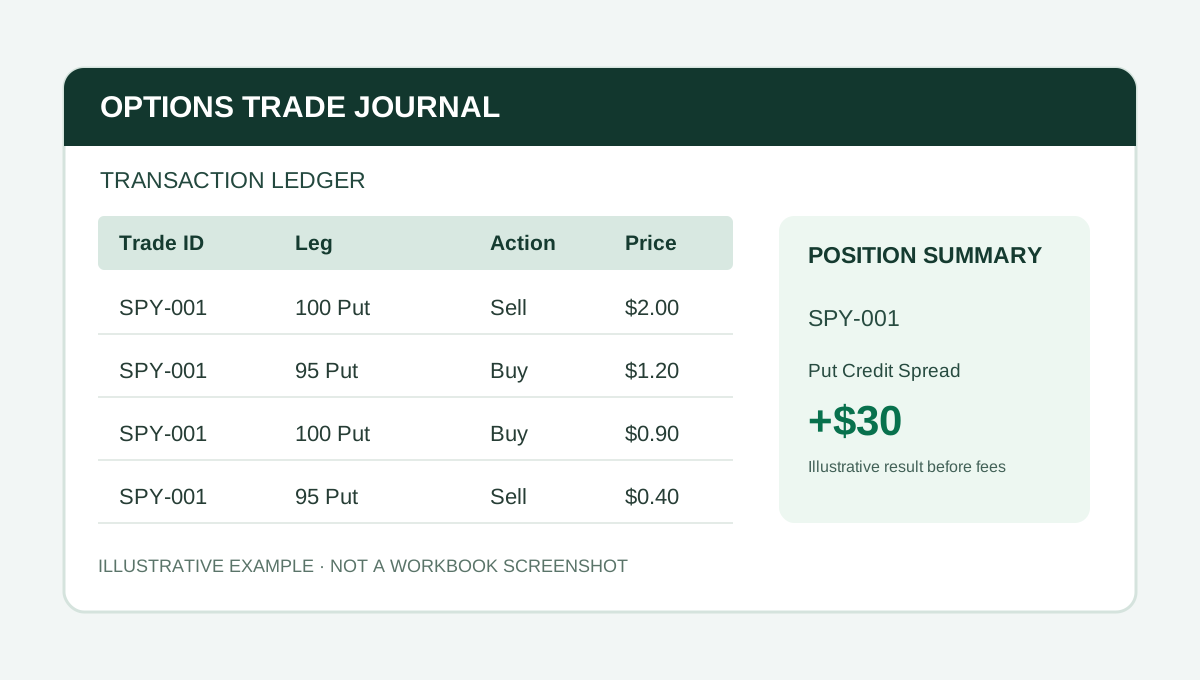
A credit spread may involve two option legs, but its completed profit and loss depends on the net opening credit, net closing debit, contract quantity, and fees. Excel can make the arithmetic transparent if you record those inputs consistently.
This is a fictional recordkeeping example, not a recommendation to enter a trade. The formulas assume standard contracts with a 100-share multiplier, no assignment or exercise, and a spread opened and closed in full.
Example: a put credit spread
Suppose you open one 100/95 put credit spread:
- Sell the 100-strike put for $2.00.
- Buy the 95-strike put for $1.20.
Your net opening credit is $0.80 per share, or $80 for one standard spread before fees.
Later, you buy back the short put for $0.90 and sell the long put for $0.40. The closing net debit is $0.50 per share, or $50.
The completed spread's gross realized P&L is $80 − $50 = $30. If total commissions and fees across all fills are $4, the net realized P&L is $26.
Excel formulas for a completed credit spread
For a simple summary table, assume:
- B2 = opening net credit per share (0.80)
- C2 = closing net debit per share (0.50)
- D2 = number of spreads (1)
- E2 = contract multiplier (100)
- F2 = total fees in dollars (4)
The gross realized P&L formula is:
**=(B2-C2)*D2*E2**
The net realized P&L formula is:
**=(B2-C2)*D2*E2-F2**
Using the hypothetical inputs above, the formulas produce $30 gross and $26 net. Keep fees in dollar units rather than mixing per-contract and per-trade costs.
What is the maximum loss?
For a conventional defined-risk vertical credit spread, before fees and assuming normal settlement and no complications, the theoretical maximum loss is the spread width minus the opening credit, multiplied by the contract count and multiplier.
Here, the width is $5 and the credit is $0.80:
**=(5-0.80)*1*100 = $420**
This is a theoretical payoff bound under the stated assumptions, not a guarantee of the actual outcome. Early assignment, expiration handling, exercise, and resulting stock positions can create additional operational risks. Fees also affect net results.
For an ordinary fully closed spread, maximum loss and realized P&L are different measurements. The $420 theoretical maximum loss is not what the example trade actually lost; the example closed for a $30 gross gain.
Common spreadsheet mistakes
- Counting credit received as immediate profit. The short option still represents an open obligation.
- Ignoring the closing debit. A $0.80 entry credit and $0.50 exit debit produce $0.30 per-share gross gain, not $0.80.
- Forgetting the multiplier. For a standard contract, $0.30 per share is $30 per spread.
- Mixing fees and premiums. Fees are usually recorded in dollars, while option prices are often quoted per share.
- Treating partial closes as full closes. Track quantities and remaining legs explicitly.
If you roll a spread, preserve the closing transactions for the old legs and opening transactions for the new ones. Read how to track rolled options in Excel for an example.
From formulas to a trade journal
A simple P&L formula is useful for one completed spread. It becomes harder to maintain when you have partial exits, rolls, iron condors, and multiple positions open at once.
Options Command Center from The Finance Desk uses a transaction ledger and shared Trade IDs to organize multi-leg fills, with position and strategy reporting. The standard workbook includes manual CSV staging but does not connect live to a broker.
For a broader checklist, see what to track in an options trading journal spreadsheet. Check the Payhip listing for current pricing, included files, and capacity.
The key is to reconcile all opening and closing fills, not just the premium received at entry.
PUT IT INTO PRACTICE
Options Command Center
Connect fills, legs, rolls, and adjustments by Trade ID, with position summaries and strategy reporting.
View Options Command Center on PayhipCheck Payhip for current pricing and compatibility.
Educational content. Examples are fictional and should be adapted and checked against your own reporting policies.
More from Stock & Options Tracking →