Stock & Options Tracking / 4 MIN READ
Options Trading Journal Spreadsheet: What Should You Track?
A practical checklist for an Excel options trading journal, from individual fills and multi-leg Trade IDs to fees, rolls, open risk, and strategy results.
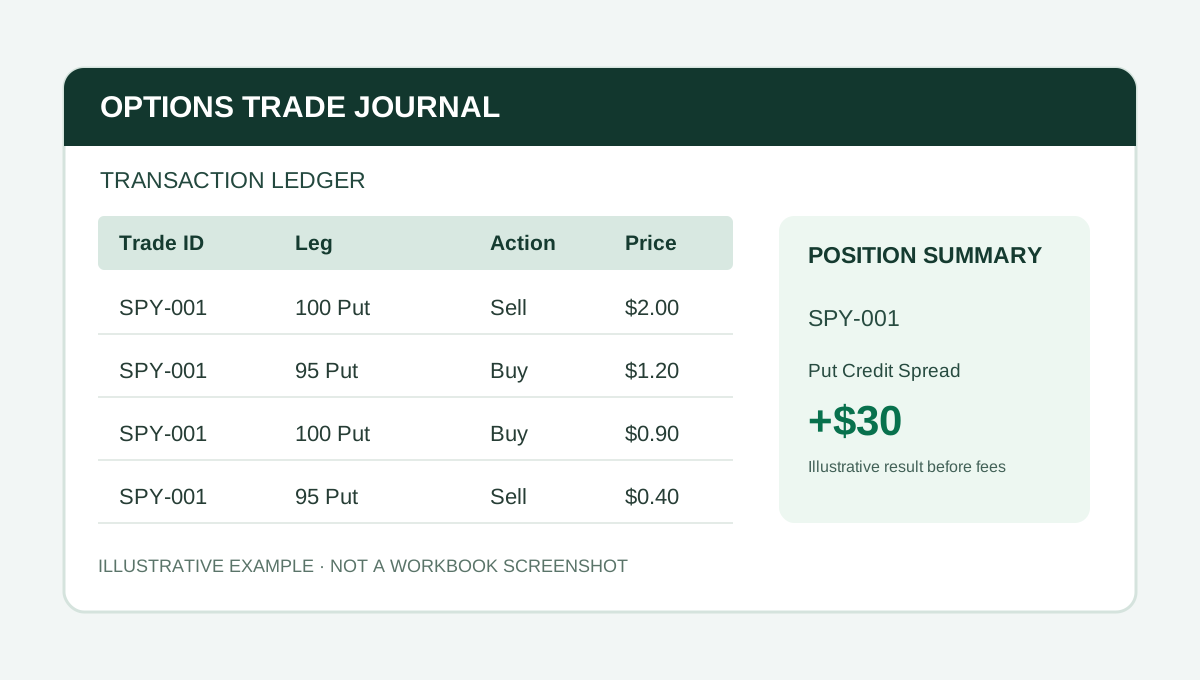
An options journal should answer a basic question: What actually happened to the complete trade? For a simple long call, that may be easy. For a credit spread, iron condor, or rolled position, a one-row record can leave out the most important details.
Here is a practical checklist for building or choosing an Excel options trading journal. The goal is reliable recordkeeping, not predicting future trades.
1. Capture each fill
Record the trade date, underlying ticker, expiration, put or call, strike, buy or sell, contract count, fill price, and commissions. Include whether each transaction opens or closes exposure.
An options spread can be entered as one broker order, but it still has multiple legs. Capturing individual fills makes adjustments and partial exits easier to reconstruct.
2. Group related legs with a Trade ID
Give the legs belonging to one position a common identifier. A four-leg iron condor should not automatically become four unrelated journal trades.
A Trade ID can also group later adjustments or rolls into a continuing trade campaign, depending on your chosen accounting convention. Keep that rule consistent across the journal.
3. Track fees and contract multipliers
For standard U.S. equity options, the commonly used multiplier is 100 shares per contract, but confirm the actual contract specification, especially for adjusted contracts.
A hypothetical spread opened for $0.80 credit on one standard contract brings in $80 before fees. If the total opening and closing commissions are $4, those fees reduce the final result by $4. Ignoring costs can materially distort small trades.
4. Separate realized from unrealized P&L
Realized P&L reflects completed closing activity under your accounting convention. Open positions can have changing market values, but those values are not final realized outcomes.
Premium collected at entry is a cash flow, not proof of profit. A journal should show what is still open and avoid declaring the entire trade closed when only some legs have been exited.
5. Preserve rolls and partial exits
A roll typically closes existing contracts and opens replacements. Save both sets of fills. Do not overwrite the original position or treat a new credit as profit without the cost of closing the prior contract.
For an example with numbers, see how to track rolled options in Excel.
6. Make strategy and ticker reporting useful
Once your trade records are consistent, summarize closed-position results by strategy and underlying. Useful measures can include trade count, gross and net realized P&L, fees, average gain and loss, and win rate.
Win rate alone is not a measure of trading edge. A strategy with many small winners and occasional large losses may still have negative results. Also consider sample size and whether adjustments are counted as one campaign or separate trades.
7. Know the limits of your spreadsheet
Before choosing a journal, ask:
- How many individual fill rows can it handle?
- Can it group multi-leg positions and track adjustments?
- Does it support stock lots used with covered calls or cash-secured puts?
- Is broker import automatic, manual, or unavailable?
- Does it require desktop Excel, and has it been tested in Google Sheets?
A workbook with a fixed ledger capacity is not the same as an unlimited database. A manual import sheet still requires review and reconciliation.
A practical option for multi-leg Excel tracking
The Finance Desk's Options Command Center is built around individual transaction fills connected by Trade ID. The standard edition includes position summaries, a dashboard, strategy rankings, ticker reporting, a stock ledger, and manual CSV staging.
Its stated capacity is 200 ledger rows, 40 position summaries, and 20 stock lots. There is no live broker synchronization. Review the product listing for current price and Excel requirements before buying.
For a worked multi-leg example, see our credit spread and iron condor tracking guide.
A useful journal does not need to be complicated. It needs to preserve the records that let you verify your results.
PUT IT INTO PRACTICE
Options Command Center
Connect fills, legs, rolls, and adjustments by Trade ID, with position summaries and strategy reporting.
View Options Command Center on PayhipCheck Payhip for current pricing and compatibility.
Educational content. Examples are fictional and should be adapted and checked against your own reporting policies.
More from Stock & Options Tracking →